Hiby M500 x Hatsune Miku: Firmware 1.20 Update Causes Issues
From: Vitor Valeri
A headphone hobbyist for over 15 years, he founded the Hi-Fi Hub website and is an administrator of the "Fones High-End" and "Fones Low-End" groups on Facebook.
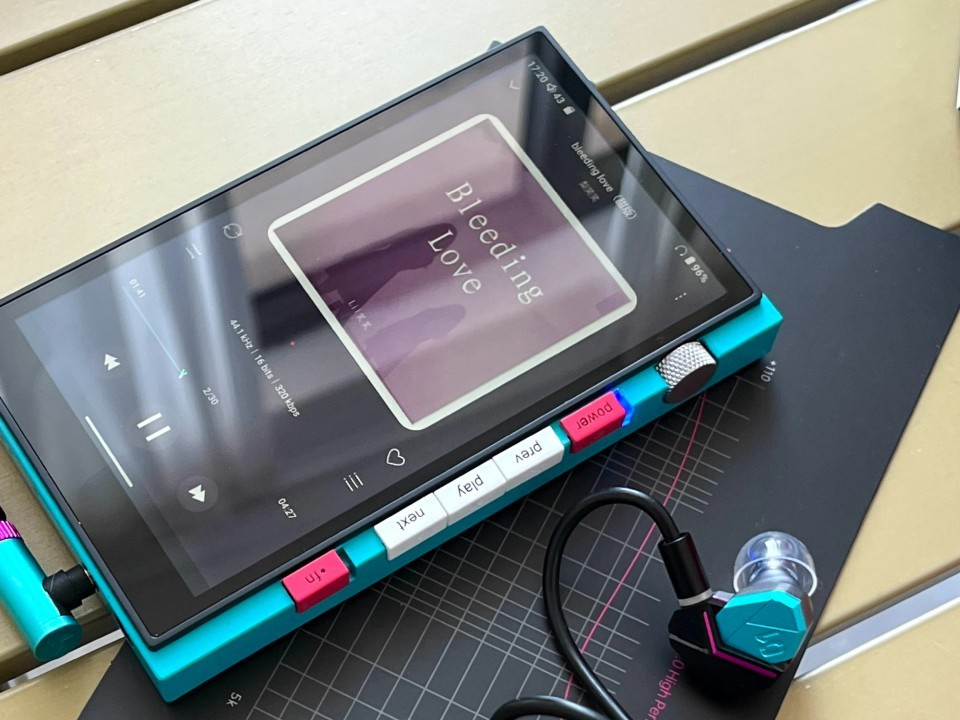
Digital Audio Player (DAP) HiBy Digital M500 x Hatsune Miku (Image: HiBy/Weibo)
Released last Wednesday (February 4), firmware update 1.20 for the HiBy Digital M500 x Hatsune Miku has been causing rapid battery drain and Bluetooth headphone disconnection issues for some users. Fortunately, HiBy has made an alternative firmware available as a temporary solution. See all the details below.
HiBy M500 Update Causes Battery Consumption and Bluetooth Connectivity Issues
Users on Reddit and the Head-Fi forum have reported rapid battery drain issues with the HiBy M500 x Hatsune Miku, even when the Digital Audio Player (DAP) is not running any music applications.
“Okay, something strange happened to my device. I updated to the latest system firmware, which took about 4–5 minutes to complete. The battery level was at 40% at the time. However, after the update (and reboot), it dropped to 19%. What is even stranger is that instead of continuing to drop, the battery level increased by 3%, reaching 22%.”
Today (February 9), another Head-Fi user reported the following:
“Great timing: I updated yesterday and the problems returned. I sent an email, but it looks like I won’t get a reply for a couple of weeks due to the Chinese New Year.”
DAP HiBy M500 x Hatsune Miku and IEM HiBy Yume x Hatsune Miku (Image: HiBy/Weibo)
On Reddit, the user “LodocArt” not only reported experiencing battery drain issues but also stated that they are facing frequent disconnections with their Sony XM4 Bluetooth headphones when using the LDAC audio codec.
“I installed the latest update from HiBy, excited to get LDAC working on my XM4. LDAC does work, but even when the device is right next to me, there are frequent disconnection warnings from the XM4. This does not happen when I’m not using LDAC.
Is anyone else using LDAC and experiencing these issues on the M500?
The battery performance is also worse than before the update. It might be a battery calibration issue, but it’s quite frustrating to continue experiencing these problems (and the DAC turning on at full volume for a split second is still not fixed…).”
HiBy Provides an Alternative Firmware as a Temporary Solution
To mitigate the battery-related issues that some HiBy M500 x Hatsune Miku users are experiencing, HiBy has made an alternative firmware available that can be installed manually. To do so, follow the steps below:
Step 01: Download the firmware ZIP file using the Google Drive link provided by HiBy.
Step 02: Copy the ZIP file (without opening or extracting it) to the internal storage of the HiBy M500 via USB connection, or copy it to a microSD card.
Step 03: On the M500, open the Settings app, select System, and tap System update.
Step 04: Tap the three dots in the upper-right corner and select Local Updates.
Step 05: Select the ZIP file you copied to the M500’s internal storage or to the microSD card.
Step 06: Proceed with the firmware installation and wait until the process is completed.
That’s it. Hopefully, installing this firmware will resolve the issue. If you encounter any bugs, please leave a comment below and share your experience with us.
Alternatively DON'T update the firmware that is offered from WITHIN the Hiby device. That web based firmware update has totally ruined battery life/battery level for me.
STICK WITH FIRMWARE 1.1 If you don't have the Hiby a battery drain issue.
Seriously, Hiby has little or no clue when they release a new model for sale. Constant issues.
H
Hiby_Victim
Just to confirm, the firmware quoted in this story 1.20 20260206-18919 14.0 is the SAME firmware as to what is now being rolled out to ALL M500 users via firmware update on their devices. So rather than just use, if you have the problem (Battery issues) they've just plonked it down for ALL M500 owners.
If anyone has a link for the 1.10 firmware, I could use it, because I want to roll the firmware back.